Multi Counter: Count & Track manages multiple tallies on Android devices
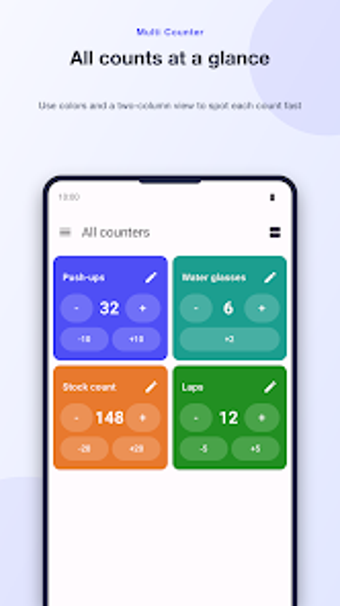
Multi Counter: Count & Track runs multiple tallies simultaneously on a single dashboard, letting you name, color-code, and set step values for each counter. Developed by 슬기로운생활연구소, the app sits in the utilities-tools category and targets fitness users, event staff, and small-business operators. Key controls include custom action buttons, tagging for grouping, and an eyes-free fullscreen mode with volume-key counting, making it practical for repeated, hands-off counting tasks.
What does the app do and who benefits most?
Multi Counter displays several independent counters on one screen, each with its own name, color, and increment or decrement step. The app supports up to four custom action buttons per counter for rapid adjustments and uses tags to group related tallies. This workflow suits people who must track parallel counts, such as workout sets, inventory items, or event attendees, because each counter keeps its own limits and settings.
Does it affect device performance during active use?
The app is built for Android and runs locally; typical operations are lightweight because counting actions are simple UI updates rather than background services. Fullscreen counting uses the display and optional vibration feedback while volume-key input maps to hardware buttons, so CPU and RAM load stays close to baseline during counting sessions. Background battery or CPU drain is unlikely since data is stored locally and no continuous syncing runs.
Is counting safe for my data and privacy?
All counter data is kept on the device without mandatory account creation or cloud syncing, which reduces external data exposure. The app relies on the device's local backup behavior for transfer between devices, so users who need transferability should verify their Android backup settings before moving data. Optional minimum and maximum limits prevent accidental overshoots by design.
Do I need technical knowledge to operate the tool?
The interface mixes simple tap controls with configurable options: set per-counter increments, add action buttons, and apply tags to filter sets. Fullscreen mode plus volume-key counting provides an eyes-free workflow for repetitive tasks, while grouping and two-column layout let more advanced users organise large numbers of counters. Casual users can start with default increments and add complexity as needed.
Suitable for routine, local tallying with one operational caveat
The tool is a suitable option for anyone who needs multiple, localized tallies on Android, from trainers to inventory clerks. The main trade-off is platform restriction, it runs on Android only. Practical deployment tip: enable your device backup pathway if you plan to migrate counters to a new device, since the app itself stores data locally. Recommended.